Build a Change
The core implementation skill is froid-build. It takes any expression of
what you want — a sentence, an issue, a spec, or a planned story — investigates
the codebase and upstream context, then plans the change, implements it,
reviews the result, and fixes the bugs it finds. See
how a run works.
Size the Work
Section titled “Size the Work”Use the smallest amount of Froid that safely fits the change. A typical
session is one goal: about 500 lines of code added or changed (not counting
tests) in a small handful of files. If it fits, give it to froid-build. If it
doesn’t, plan that bigger piece of work first — see
Choose a Planning Path. You
often cannot tell until you try; if you aren’t sure, ask froid-help.
For a trivial edit you are willing to review yourself, skip the process
and ask the agent to make it directly. But if a bug could escape into
production, froid-build is likely worth it.
Run froid-build
Section titled “Run froid-build”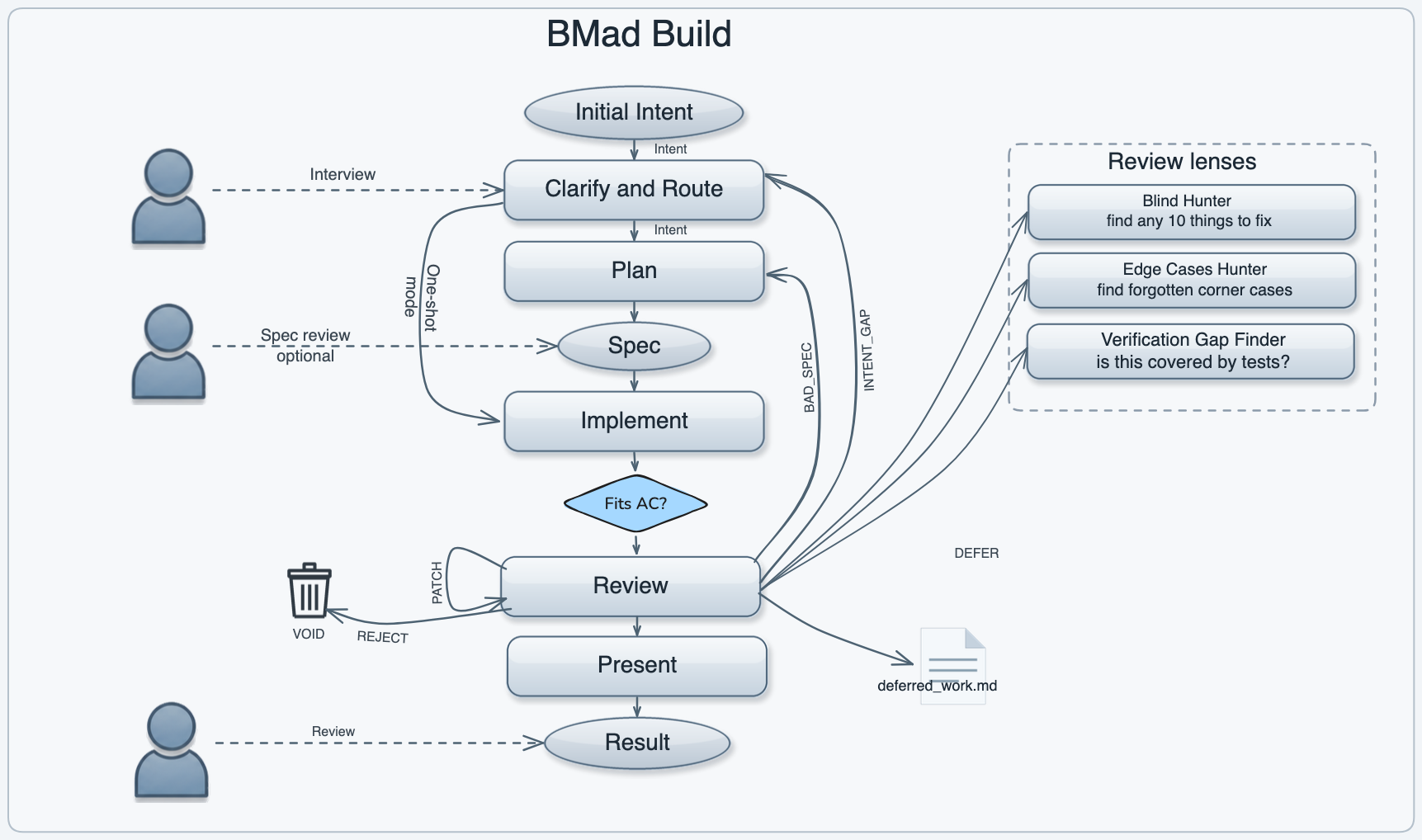
1. Start a Fresh Chat
Section titled “1. Start a Fresh Chat”Open a fresh chat in your AI IDE. Reusing a session from another workflow can mix contexts and confuse the run.
2. Give It Your Intent
Section titled “2. Give It Your Intent”You can describe the change before, with, or after the command. It does not have to be tidy. A ramble, a voice dump, a half-formed thought, an issue link, a file, or a planned story all work — anything the model can turn into a concrete goal.
/froid-build Fix the login validation bug that allows empty passwords./froid-build Fix https://github.com/org/repo/issues/42./froid-build Implement the intent in_froid-output/implementation-artifacts/my-intent.md.I think the problem is in the auth middleware, it's not checking token expiry.Let me look at it... yeah, src/auth/middleware.ts line 47 skipsthe exp check entirely. /froid-build/froid-build> What would you like to do?Refactor UserService to use async/await instead of callbacks.3. Resolve Intent from Evidence
Section titled “3. Resolve Intent from Evidence”froid-build starts from your request and investigates the codebase and any
upstream planning artifacts before deciding whether anything material is still
missing. The input can start rough; clear, evidence-supported requests proceed
without a clarification turn. When something is unclear, it looks for evidence
first — only what the repository and planning context cannot settle becomes an
open question on a finished design, not an interview before work starts.
Answer open questions carefully when they appear. A wrong call there is the most expensive kind of mistake to find later.
4. Approve a Plan When Asked
Section titled “4. Approve a Plan When Asked”After investigation, froid-build routes to the smallest safe path. It reports
three facts about the settled design: intent gaps (things you did not say that you
would notice in the result), irreversible actions, and footprint. A design
clean on all three takes the light path — a minimal spec and implementation in
the same session, reviewed afterwards. Anything flagged gets a full written
plan first, with each intent gap recorded as an open question you answer
before approval.
Approve the plan when it describes the right thing to build. Push back if it does not — fixing the plan is cheaper than fixing the code.
5. Implementation and Review
Section titled “5. Implementation and Review”After that decision, froid-build implements the change, reviews its own work
with independent reviewers, fixes problems that belong to this change, and
commits locally. This works best on a platform that can spawn subagents, or at
least call another model from the command line and wait for a result.
Review is triage, not a dump of every possible note. Issues that belong to the current change get fixed. Unrelated pre-existing issues get deferred. If the code is wrong because the plan was weak, or the plan is wrong because the goal was wrong, it goes back to that layer and regenerates from there instead of patching only the diff.
For a standalone review — a PR, someone else’s change, an extra pass, or a review bot — see Review a Change.
6. Review the Result
Section titled “6. Review the Result”When it finishes, froid-build shows you the completed change and its review
notes. This is the main checkpoint. For a guided walkthrough of the finished
work, see Walk Through a Change.
- Skim the diff to confirm the change matches your intent
- If something looks off, tell the agent what to fix — it can iterate in the same session
Once you are satisfied, push the commit. It can offer to push and create a PR for you.
What You Get
Section titled “What You Get”- Modified source files with the change applied
- Passing tests (if your project has a test suite)
- A ready-to-push commit with a conventional commit message
- An implementation record for the run, kept beside the parent spec or story when there is one
For generated API and end-to-end coverage of the finished work, see Test Completed Work.
Deferred Work
Section titled “Deferred Work”Each run stays focused on one goal. If your request contains several independent
goals, or review finds pre-existing issues unrelated to your change,
froid-build writes them to deferred-work.md in your implementation artifacts
directory instead of trying to do everything at once.
Check that file after a run — it is a backlog of follow-ups. You can feed each
item into a fresh froid-build run later.
When to Plan First
Section titled “When to Plan First”Add a spec, or PRD, UX, architecture, and story planning, before running
froid-build when:
- The change affects multiple systems or needs coordinated updates across many files
- You are unsure about the scope and need requirements discovery first
- You need documentation or architectural decisions recorded for the team
- Clarifying the intent keeps surfacing contradictions that one session cannot resolve
Larger work becomes a sequence of one-session changes. That sequence can change
as implementation teaches you more. Parent specs keep the shared goal; story
records carry decisions and completion state; integration checks and
retrospectives cover the combined result. froid-build handles one unit. It does
not own the backlog, pick the next story, or replace those later checks.
Use froid-build for foundational, risky, or important stories where your
decisions may set patterns for later work. Once those patterns are stable,
froid-build-auto can run one unit without waiting for you; see
Autonomous Development Loops.
Why Does This Take So Long? I Could Plan Mode and Code It in Ten Minutes
Section titled “Why Does This Take So Long? I Could Plan Mode and Code It in Ten Minutes”You can. The plan-and-implement half of froid-build usually takes about as
long, and it usually needs a couple fewer turns from you. It then reviews
the result thoroughly, triages the findings, and automatically fixes the
ones worth fixing. “Plan mode and code” does none of this. You have to
invoke a review by hand, then spend time disposing of every finding —
including the noisy and unrelated ones. See
Review a Change.
Human attention is by far the most expensive resource, and the productivity bottleneck in AI-backed software development.
For a throwaway prototype, or a trivial change you will review yourself,
skip the process; see Size the Work. Or tell
froid-build to take the one-shot route, or to skip review. But if you are
serious about the quality of the product, just let the process run and spend
your attention where it is irreplaceable. That extra time and inference
is worth it.